
Tips for Organizing a Clutter-Free Home Office to Boost Productivity
lapanie.pro >> society>> Tips for Organizing a Clutter-Free Home Office to Boost Productivity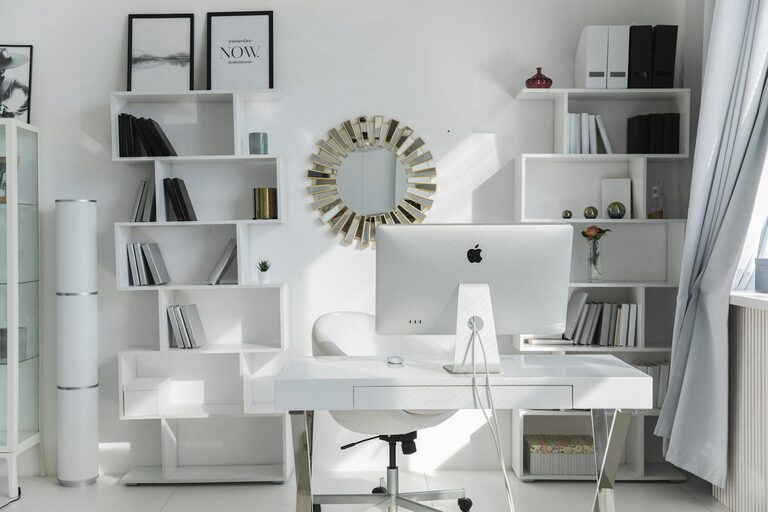
Tips for Organizing a Clutter-Free Home Office to Boost Productivity
Creating a productive and comfortable home office is essential for anyone who works from home or spends long hours at a desk. Clutter can quickly accumulate, making it hard to focus and sometimes leading to stress. Fortunately, organizing your home office doesn’t need to be complicated. With some simple strategies, you can design a clutter-free workspace that promotes both productivity and comfort.
Why a Clutter-Free Home Office Matters
A tidy workspace helps clear your mind and keeps distractions at bay. When your office is well-organized, you can find important items easily, manage tasks efficiently, and create a pleasant environment that encourages focus. Plus, having a comfortable office setup reduces physical strain, helping you stay energized throughout your workday.
Start with Decluttering
Before organizing, take a moment to declutter your space. Sort through papers, supplies, and equipment.
Steps to Declutter:
– Sort Items: Group things into categories—keep, donate, recycle, or discard.
– Clear Surfaces: Remove everything from desks and shelves, and put away only what you need daily.
– Digitize When Possible: Scan documents to reduce paper piles.
Decluttering frees up space and gives you a fresh canvas to work with.
Optimize Your Desk and Chair Setup
Your desk and chair are the centrepieces of your home office. Choose pieces that fit your space and support ergonomic comfort.
– Desk: Opt for a size that fits your work materials without overcrowding.
– Chair: Select a chair with proper back support and adjustable height.
– Position: Place your desk near natural light if possible, but avoid glare on your screen.
A comfortable seating arrangement reduces fatigue and encourages better posture.
Use Smart Storage Solutions
Efficient storage keeps your office tidy without sacrificing accessibility.
Storage Ideas:
– Shelving Units: Wall-mounted shelves save floor space.
– Drawer Organizers: Use trays or dividers to keep small items in order.
– Filing System: Label folders and store important papers in cabinets.
– Baskets and Boxes: Store cables, chargers, and supplies neatly.
Having designated places for everything helps maintain order.
Keep Cables and Electronics Managed
Electronic devices and chargers can clutter your desk.
– Use cable clips or sleeves to bundle wires neatly.
– Consider wireless devices where possible.
– Unplug devices when not in use to avoid a tangled mess.
A clean setup reduces distractions and prevents hazards.
Create Zones for Different Activities
If your office space allows, designate areas for tasks like computer work, reading, or creative brainstorming.
– Use a comfortable chair and good lighting for reading.
– Keep frequently used supplies near your desk.
– Set aside a whiteboard or corkboard for notes and reminders.
Zoning helps separate tasks and keeps materials organized.
Incorporate Personal Touches Without Overdoing It
Personal items can make your office more inviting, but too many can clutter your space.
– Display a few photos or plants for a welcoming feel.
– Choose minimalistic décor that complements your office theme.
– Rotate items occasionally to keep the environment fresh.
Personal touches should support your comfort, not distract you.
Maintain a Daily Clean-Up Routine
Consistency is key to preventing clutter buildup.
– Spend five to ten minutes at the end of each day tidying your desk.
– File papers immediately and put supplies back in place.
– Wipe surfaces regularly to keep dust away.
Daily habits make a big difference in sustaining an organised space.
Use Technology to Reduce Physical Clutter
Digital tools can help minimize paper and physical distractions.
– Use cloud storage for documents.
– Employ task management apps to replace sticky notes.
– Schedule reminders digitally rather than with physical calendars.
Technology makes keeping your workspace neat easier and more effective.
Lighting and Air Quality Matter
Good lighting reduces eye strain, while fresh air keeps you alert.
– Use adjustable desk lamps with warm light for a comfortable atmosphere.
– Open windows or use air purifiers to maintain air quality.
– Add plants that improve air quality and also enhance ambiance.
A pleasant environment supports your wellbeing and productivity.
—
With these tips, you can transform your home office into a clutter-free zone that promotes focus and comfort. Remember that organisation is an ongoing process — regular tidying and thoughtful design choices will help you maintain a productive workspace that feels good to be in. Happy organizing!
Related Post
How to Create a Cozy and Inviting Home Office Space
Creating a cozy and inviting home office is essential in today’s world, where many people…